| Software, software options and copying
methods |
|
Downloads & Links
Manual and
installation guide for downloading
Available software options with order
number
Software Parallel Verification – 31AL2001
Software interface for e.g. external serialization– 31AL2004
Software OTP support – 31AL2005
Software Write Protect SD/MMC – 31AL2006 |
|
Software
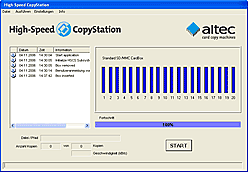
Our copying software, which was developed in-house, has
the same »Look & Feel« in
all altec CopyStation models.
The user interface can be switched
between German and English – further
languages are availble as an option.
The Job Wizard is a key part
of the software. It is used to specify all parameters of
the copy job – Name of the card image, number of copies,
whether verification is required and configuration of the
software options.
Software options
1.) Software option for parallel verification.
2.) Optional software
interface for data exchange with external application to allow customization
of individual memory cards, e.g. serialization or data encryption.
3.) Software option for programming OTP (One
Time Programmable) SD and MMC cards.
4.) Software option to set a temporary or permanent
write protection flag on SD
Card or MMC.
The temporary write protection can be reset by the software. |
|
Copying methods
The High-Speed CopyStation Edition 1000 provides three different
copying methods for copying the data:
1.) Image Copy (default method, for free) – an image of the entire contents of the memory media is created and then copied to the target memory media.
Advantages: A 1:1 copy of the memory media is
created. Accordingly, all sectors of the target memory media are overwritten.
This method is supported by all memory media file systems.
Disadvantages: Copying is relatively time consuming
because all of the bytes of the original memory medium are copied.
2.) Short Image Copy (for free) – only the data sectors which are currently being used are copied.
Advantages: Significant time-saving if the master
(source ) memory media is only partly filled with user data.
Disadvantages: If the target memory media has
already been used, some of the unused blocks may still contain old data.
For maximum benefit, the data on the source memory media should not be fragmented.
3.) File Copy (for free) – this means that copies of specific file directories or files as well as of possibly existing subdirectories are created. This is not a 1:1 copy of the memory master.
Advantages: The velocity depends on the files which need to be copied, but often it is – if the amount of data is smaller than the image – faster than when copying an image. But the velocity also depends on the fact how often the File Allocation Table needs to be rewritten. There is no need to create an image-file.
Disadvantages: This copying method only works with windows-supported FAT file system. The transfer speed is hard to estimate and therefore this copying system only makes sense when small amounts of data need to be copied.
|
|
